Archived Transactions Overview
Our archived transactions overview lets you easily navigate through all transactions that have gone through one of our supported protocols.
Archived Transactions Table Overview
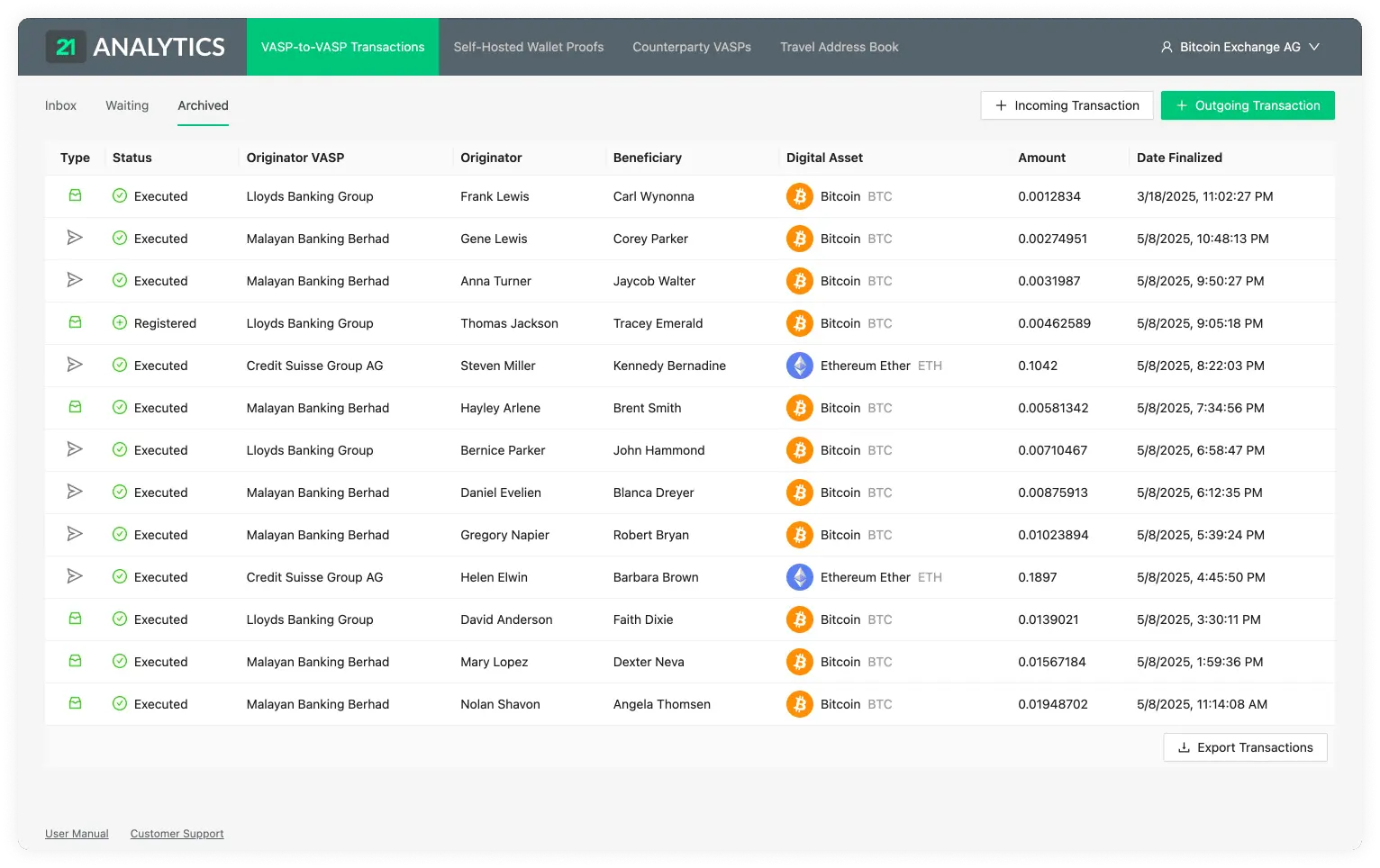
Each row contains the following fields:
Type
Status
Beneficiary
Originator
Originator VASP
Digital Asset
Amount
Finalized At
Type
The inbox-tray icon represents Received, while the paper-plane icon represents Sent. Hover over either icon to display the transaction type.
When the Type has the Received value, a counterparty VASP has sent you, the compliance officer, a transaction. This transaction was either Executed, Declined, Cancelled or Registered.
When the Type has the Sent value, it means you have sent a transaction to a counterparty VASP through the Outgoing Transaction button. This transaction was either Executed, Declined or Cancelled.
Status
On the archived tab there are a few possible statuses:
The best and most common status should be Executed.
If most of your transactions have the status of Executed this means things are working correctly and the transaction is compliant; one of the viable protocols has been used to verify this transaction as compliant.
If the transaction has the status of Declined this means the beneficiary VASP has decided to not allow the transaction to go through. This could be due to KYC checks not meeting the requirements expected by the beneficiary VASP.
If the transaction has the status of Cancelled this means the beneficiary VASP approved it, but then the originator decided to cancel the transaction from going through at the last stage of the handshake. This could be due to KYC checks ran on the beneficiary VASP not being validated.
Last of all, as a fallback to the viable protocols, transactions can be manually archived. This might not be fully compliant in some cases but it's useful to keep for future references or for countries that request less information. This will go into a status of Registered.
Beneficiary
The name and surname, as registered in the passport or national identity document of the person receiving the transaction.
Originator
The name and surname, as registered in the passport or national identity document of the person sending the transaction.
Originator VASP
The VASP of the customer who sent the transaction.
Digital Asset
Shows the symbol, name and currency code of the Digital Asset Sent or Received in the transaction. Clicking on the name will redirect you to Coinmarketcap, where you can see live information about the transaction’s asset.
Amount
The amount of a particular Digital Asset sent from the Originator to the Beneficiary. Yes, we do support the entire 18 decimals for Ethereum.
Finalized At
The time and date the transaction was either Executed, Declined, Cancelled or Registered. The format shown is day/month/year and hour/minutes/seconds. The time will be shown in the time zone configured in your browser and can be seen by hovering over the transaction date. This will reveal a tooltip with the timezone: continent/city format.