Proofs Overview
Our proofs overview allows you to easily navigate through all the self-hosted address ownership proofs.
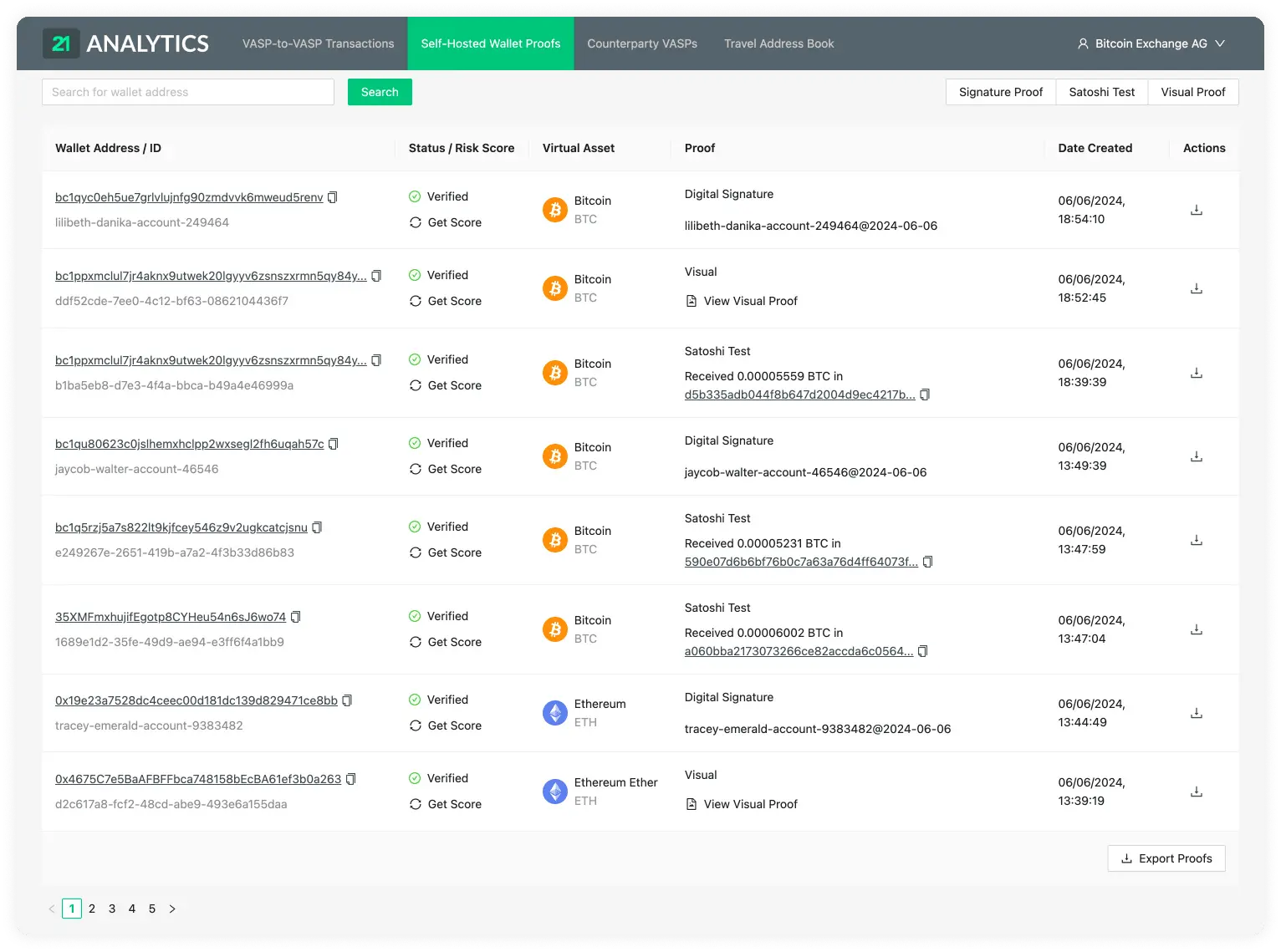
Table Columns Overview
Wallet Address / ID
Status / Risk Score
Digital Asset
Proof Type
Proof
Customer ID
Created At
Actions
Wallet Address / ID
The wallet address that is being checked for proof of ownership. These refer to an external self-hosted address of one of the customers of your VASP. Clicking on it will open a new tab showing the Blockbook Block Explorer where you will be able to see the details of this particular address.
Each proof has a unique ID which can be found under the wallet address.
Status / Risk Score
Can be either Verified, Pending, Submitted or Failed.
Proofs that were successfully confirmed will go into a Verified status.
Pending, Submitted and Failed are specific to the Satoshi Test proof type.
If it’s Pending, it means the blockchain transaction has not yet been transferred; this means the wallet ownership is not yet confirmed.
If it’s Submitted, it means the user has submitted a transaction ID, but the involved addresses and amounts need yet to be verified.
If the user does not submit a transaction ID within the configured Satoshi Test time limit from the time created, the proof will fail, and there will be no proof of ownership for this particular address.
For the risk score, a blockchain analytics tool needs to be set up and you will see a score of either Severe, High, Medium or Low.
Digital Asset
The Digital Asset that the external self-hosted wallet holds.
Proof
The method type used to show proof of ownership of the customer's self-hosted wallet. We currently have three options:
- Signature Proof
- Satoshi Test
- Visual Proof
The method type selected will be displayed above the proof data on each row.
Signature Proof
If you used the signature proof method, this field would show the message used to create the digital signature.
Satoshi Test
If successfully verified, this will show a message like the following:
Received 0.00005175 BTC in 232025407cae6b158c67af3d4c590012f...
if pending, it will show the following message:
14UAZPRVtNb5T5nbRLoGJmj5U6n9CmeY2Q must be verified within {HOURS_SET_ON_CONFIG}h
Hover over this message to display the link you can send to your customer, then use the adjacent copy button to copy it.
In the case the transaction fails, the field will show something like this:
Expired without proof on 21/02/2023, 13:46:18
Visual Proof
For a Visual Proof, click View Visual Proof in this column to open the
uploaded file in a new tab.
Customer ID
The customer ID allows you to identify your customer. Sometimes, this is also referred to as "Account ID" or "Account Number".
Created At
The time and date the proof method was created. The format shown is day/month/year and hour/minutes/seconds. The time will be shown in the time zone configured in your browser and can be seen by hovering over the transaction date. This will reveal a tooltip with the timezone: continent/city format.
Actions
The Actions column provides controls to save a proof as a file or verify a submitted Satoshi Test. Hover over an icon to see its action name.
Save As File
Click the download icon labelled Save As File to download an .xlsx (Excel)
file containing the proof data.
Verify
This action is specific to the Satoshi Test. After checking
the transaction against a VASP wallet or blockchain explorer, click the
check-mark icon labelled Verify to verify it.